UPRTOU Samarth Portal – Student Login, DEB ID and Password Reset
- UPRTOU applicants log into the Samarth portal at uprtouadm.samarth.edu.in using their registered email and password.
- UPRTOU students reset lost Samarth passwords by submitting their registered programme name and enrolment number.
- UPRTOU distance learning admissions mandatorily require a unique DEB ID created using an Academic Bank of Credits ID.
- UPRTOU credit transfers are requested directly by learners through the Academic Bank of Credits dashboard on DigiLocker.
On this page
- UPRTOU Alerts & Notifications
- UPRTOU samarth student login – admission portal procedure
- UPRTOU samarth password reset – academic enrolment verification
- UPRTOU samarth registration – academic programme code options
- UPRTOU ABC ID generation – digilocker user registration workflow
- UPRTOU DEB ID creation – distance education bureau portal steps
- UPRTOU APAAR card correction – DEB ID support ticket process
- UPRTOU credit transfer – academic bank of credits portal process
- UPRTOU student login – security and domain verification rules
- UPRTOU student corner – online services and grievance portal resources
- UPRTOU pages you will need
- Download UPRTOU Official Documents
- Questions Students Ask About UPRTOU
- More on Student Services
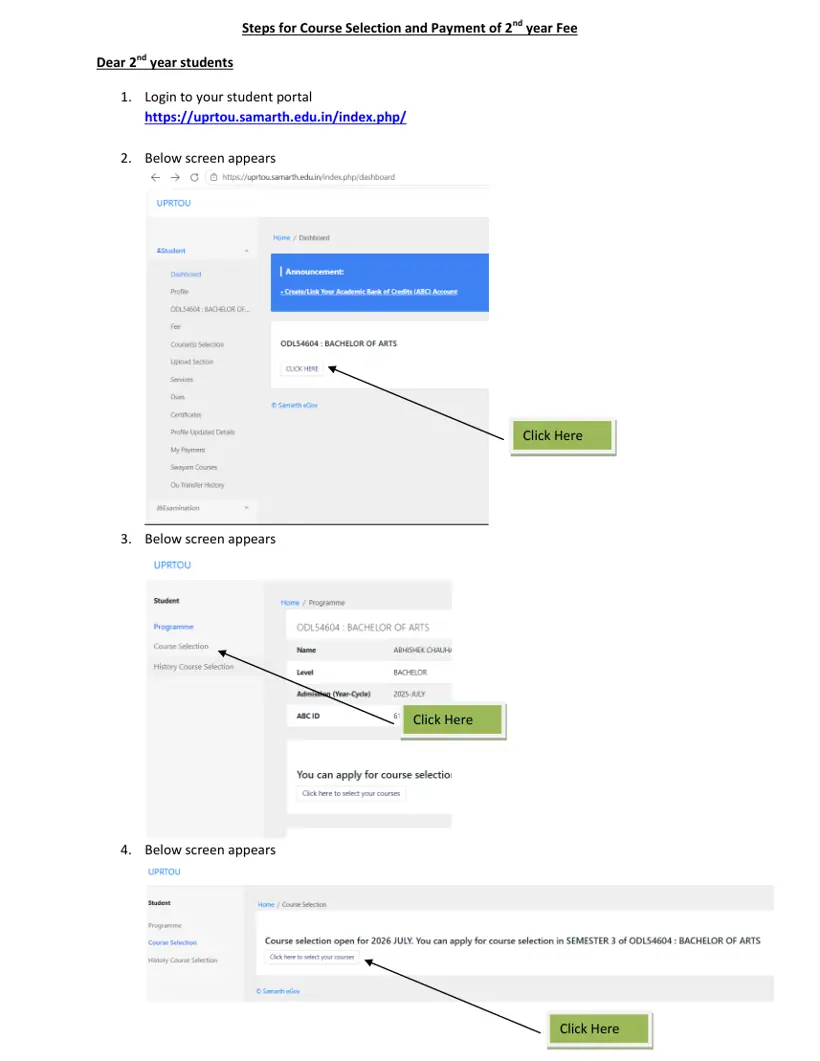
UPRTOU samarth student login – admission portal procedure
UPRTOU samarth portal provides a dedicated user login interface for first-year distance education admission applicants. Learners enter their credentials on the official portal to view their dashboard.
- Open the UPRTOU Samarth admission login portal on your web browser.
- Enter your registered Email ID in the user ID input field.
- Type your secret account password into the password field.
- Enter the captcha security code displayed on the screen.
- Select the Login button to enter your applicant account.
UPRTOU samarth password reset – academic enrolment verification
UPRTOU samarth account password reset allows students to restore portal access using their academic enrolment credentials. The system verifies enrolment numbers against selected academic programmes.
- Go to the UPRTOU Samarth password reset page.
- Select your enrolled academic programme from the Select Programme drop-down list.
- Enter your unique enrolment number in the Enrolment Number field.
- Click the Submit button to verify details and recover your password.
UPRTOU samarth registration – academic programme code options
UPRTOU samarth registration forms require applicants to select their specific academic programme code. The portal supports awareness, certificate, diploma, undergraduate, and postgraduate options.
UPRTOU Samarth Academic Programme Options
| Programme Code | Full Programme Name | Level |
|---|---|---|
| APCO-19 | Awareness Programme on COVID-19 | Awareness |
| CCC | Certificate in Computer Course | Certificate |
| CCY | Certificate in Yoga | Certificate |
| DDM | Diploma in Disaster Management | Diploma |
| DHRM | DIPLOMA IN HUMAN RESOURCE MANAGEMENT | Diploma |
| ODL54601 | BACHELOR OF COMMERCE | Undergraduate Degree |
| ODL54604 | BACHELOR OF ARTS | Undergraduate Degree |
| ODL54605 | BACHELOR OF SCIENCE | Undergraduate Degree |
| ODL54606 | BACHELOR OF BUSINESS ADMINISTRATION | Undergraduate Degree |
| ODL54635 | Bachelor of Computer Applications | Undergraduate Degree |
| ODL54608 | MASTER OF ARTS (HINDI) | Postgraduate Degree |
| ODL54614 | MASTER OF COMMERCE | Postgraduate Degree |
| ODL54627 | MASTER OF BUSINESS ADMINISTRATION | Postgraduate Degree |
| ODL54628 | MASTER OF COMPUTER APPLICATIONS | Postgraduate Degree |
| ODL54633 | MASTER OF SCIENCE (MATHEMATICS) | Postgraduate Degree |
Other UPRTOU services students check
UPRTOU ABC ID generation – digilocker user registration workflow
UPRTOU students must generate an Academic Bank of Credits ID to store and transfer academic credits digitally. Registration is completed using a mobile number through DigiLocker.
- Open DigiLocker or consult the UPRTOU ABC ID creation guide PDF.
- Select My Account and click on Login as Student.
- Click Sign up with DigiLocker and enter your valid mobile number.
- Enter the One Time Password received via SMS and select Continue.
- Enter your security Personal Identification Number and click Submit.
- Access the student dashboard to view your allotted unique ABC ID.
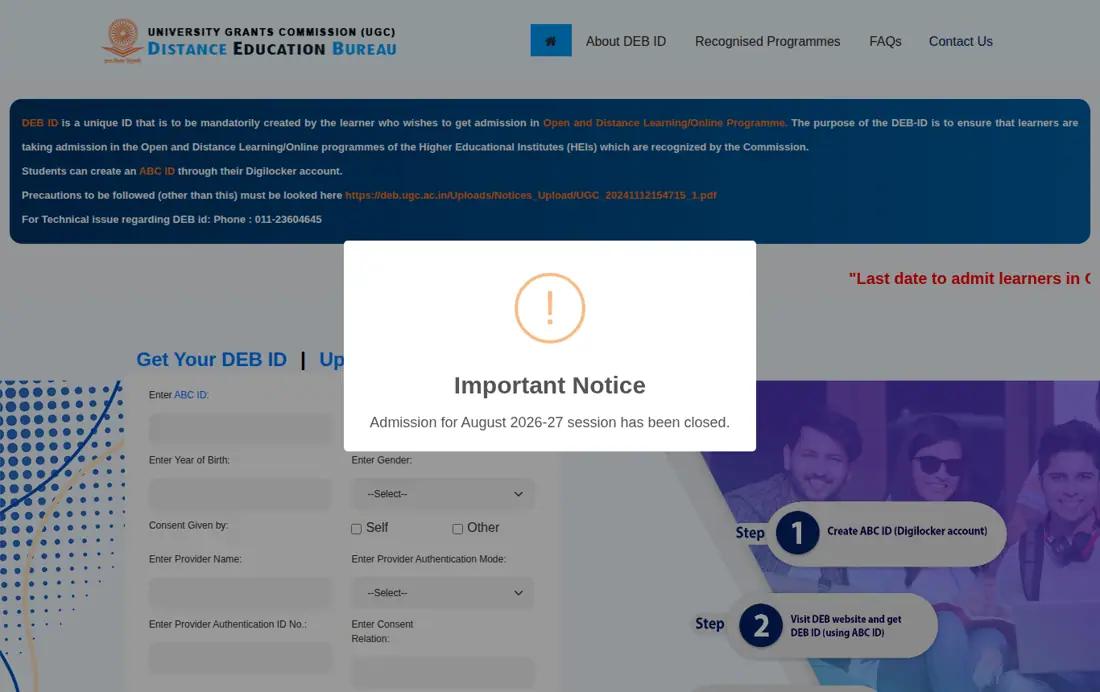
UPRTOU DEB ID creation – distance education bureau portal steps
UPRTOU candidates seeking distance education admissions must mandatorily create a Distance Education Bureau ID. Creation requires a valid Academic Bank of Credits ID and identity authentication.
- Open the DEB ID portal registration page or read the UGC DEB ID information page.
- Type your Academic Bank of Credits ID into the ABCID field.
- Fill in your Aadhaar Name, Birth Year, and select your Gender.
- Choose a Provider Authentication Mode like PAN Card, Passport, UID, EPIC, or Driving License.
- Enter your Provider Authentication ID number in the designated field.
- Provide your Consent Relation, Consent Place, Email, and Mobile number.
- Enter the captcha code, tick the agreement box, and click Submit.
UPRTOU APAAR card correction – DEB ID support ticket process
UPRTOU students must fix errors in their APAAR or ABC card before creating or updating a DEB ID. Updates are submitted after verifying corrected identity records.
- Check your APAAR card for mistakes in your name, gender, or birth date.
- Submit a ticket on support.abc.gov.in, use the DigiLocker app, or call 18008893511.
- Verify that your APAAR card details have been updated successfully.
- Visit the DEB ID portal update link to refresh your registered DEB details.
UPRTOU credit transfer – academic bank of credits portal process
UPRTOU credit transfer allows students to request digital transfer of accumulated course credits between academic institutions. Requests are submitted directly from the ABC student dashboard.
- Log into your ABC dashboard and select the Transfer Credits button.
- Accept the terms and conditions checkbox and click Proceed to Transfer.
- Select your target University, Course Details, and Stream Details.
- Select individual subject checkboxes for credit transfer.
- Review your selected credits, check the consent box, and submit the request.
- Track your request status on the dashboard until approved or rejected.
UPRTOU student login – security and domain verification rules
UPRTOU student login links on Samarth follow standard official web domain conventions. Students must verify URL security before entering login credentials.
- Official Indian academic websites strictly use domain names ending in.ac.in or.edu.in.
- Samarth HEI admission portals follow the format {institute_short_code}.samarth.ac.in or {institute_short_code}.samarth.edu.in.
- Secure connection displays HTTPS protocol and a lock icon indicating SSL/TLS data encryption.
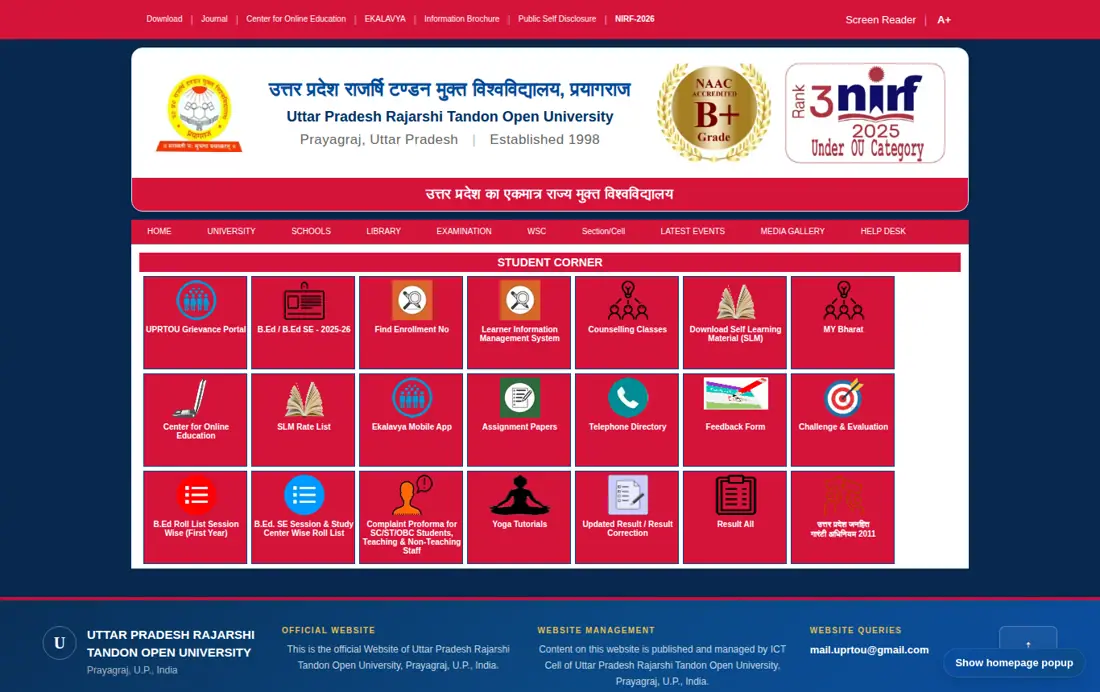
UPRTOU student corner – online services and grievance portal resources
UPRTOU student corner portal provides direct access to evaluation services, results, study materials, and administrative contacts. Students access these resources online.
- Access student services, result correction, and study materials on the UPRTOU student corner portal.
- Submit evaluation re-checks through the UPRTOU challenge evaluation portal.
- Download Self Learning Material, assignment papers, and access the Learner Information Management System.
- Lodge complaints via the UPRTOU Grievance Portal or SC/ST/OBC complaint proforma.
- Contact university offices using numbers listed in the UPRTOU telephone directory.
Fast facts
- Samarth Admission Portal URL: uprtouadm.samarth.edu.in
- Samarth Reset Password Portal: uprtou.samarth.edu.in
- DEB ID Registration Portal: deb.ugc.ac.in
- ABC ID Portal Link: www.abc.digilocker.gov.in
- ABC Support Call Center: 18008893511
- DEB ID Validity: Full ODL/OL learning life cycle
Questions Students Ask About UPRTOU
What is the UPRTOU Samarth portal login address for first year admission?
The official UPRTOU Samarth portal login address for first-year admission is uprtouadm.samarth.edu.in. Applicants enter their registered email ID, password, and captcha security code on this portal to log into their account. The domain follows the official HEI format using SSL encryption.
How do I reset my password on the UPRTOU Samarth portal?
You can reset your password on the UPRTOU Samarth portal by visiting uprtou.samarth.edu.in/index.php/studentlogin/registration/reset-password. Select your registered programme name, such as ODL54604 Bachelor of Arts or ODL54627 Master of Business Administration, from the drop-down menu and enter your enrolment number. Click the Submit button to initiate account recovery.
Is a DEB ID mandatory for UPRTOU open and distance learning admissions?
Yes, a DEB ID is mandatory for all students seeking admission to UPRTOU open and distance learning programmes. This rule applies to every learner enrolling in UGC-recognized ODL courses to verify approved university status. Applicants must visit deb.ugc.ac.in and register using their unique Academic Bank of Credits ID and identity documents.
How can I create an ABC ID for UPRTOU registration?
You can create an Academic Bank of Credits ID by registering at www.abc.digilocker.gov.in through DigiLocker using your mobile number. Enter the One Time Password sent via SMS and set your security PIN to view your unique ABC ID. Provide this ABC ID to UPRTOU so the university can upload earned course credits.
How do I create a DEB ID for UPRTOU admission?
You can create a DEB ID by visiting deb.ugc.ac.in and registering with your valid ABC ID. Enter your Aadhaar Name, Birth Year, Gender, and an authentication document such as a PAN Card, Passport, UID, EPIC, or Driving License. Submit your mobile number, email, and captcha code to generate the DEB ID.
What should I do if my APAAR card or ABC ID details are incorrect?
If your APAAR card or ABC ID contains incorrect details like your name, gender, or birth year, raise a ticket at support.abc.gov.in or call 18008893511. You can also use the DigiLocker mobile app to submit correction requests. Once you confirm that your APAAR card is updated, visit deb.ugc.ac.in/StudentDEBId/UpdateDebDetails to update your DEB ID.
How do students transfer credits using the Academic Bank of Credits portal?
Students initiate credit transfers by logging into their Academic Bank of Credits dashboard at www.abc.digilocker.gov.in and selecting Transfer Credits. They must select the target university, course, stream, and specific subject credits before submitting the request. The destination institution then reviews the transfer request under UGC guidelines to approve or reject it.
What programmes can be selected on the UPRTOU Samarth password reset page?
The UPRTOU Samarth password reset menu includes programmes like ODL54604 (Bachelor of Arts), ODL54605 (Bachelor of Science), ODL54601 (Bachelor of Commerce), ODL54627 (Master of Business Administration), ODL54628 (Master of Computer Applications), and CCC. Students select their enrolled programme with their enrolment number to proceed with verification. This facility covers awareness, certificate, diploma, undergraduate, and postgraduate options.
Which identity authentication documents are accepted for UPRTOU DEB ID registration on the DEB portal?
Applicants can register for a DEB ID on deb.ugc.ac.in using identity documents such as a PAN Card, Passport, UID, EPIC, or Driving License. During registration, learners enter their ABC ID, Aadhaar Name, Birth Year, Gender, and Provider Authentication ID. The portal requires consent details, email, mobile number, and captcha verification.
How can students resolve ABC ID or APAAR card discrepancies before UPRTOU DEB ID registration?
Students must resolve ABC ID or APAAR card discrepancies by logging into support.abc.gov.in or calling the support helpline at 18008893511. Correction requests can also be submitted directly through the DigiLocker mobile application. Once your APAAR card details are updated, proceed to deb.ugc.ac.in to complete your DEB ID registration.
What is the validity period of a DEB ID for UPRTOU distance learning programmes?
A DEB ID remains valid across the entire academic life cycle of a student in open and distance learning mode. This unique identification applies to all UGC-recognized ODL courses offered by approved institutions like UPRTOU. Even if a student registers for two approved ODL programmes simultaneously, the same DEB ID remains active throughout.
Can a student create a DEB ID for UPRTOU admission without an ABC ID?
No, a student cannot create a DEB ID for UPRTOU admission without a valid Academic Bank of Credits ID. Applicants must first register on www.abc.digilocker.gov.in using their mobile number to generate a unique ABC ID. After obtaining the ABC ID, learners visit deb.ugc.ac.in to complete their DEB ID registration for open and distance learning courses.
How can I recover my registered email ID for UPRTOU Samarth portal login?
You cannot recover your registered email ID for the UPRTOU Samarth portal directly through the online password reset process, as that requires your enrolment number. Instead, contact the university help desk for assistance with login issues. They can help verify your identity and provide details about your registered email ID.
What is the purpose of a DEB ID for UPRTOU distance learning admissions?
The primary purpose of a DEB ID for UPRTOU distance learning admissions is to ensure learners enroll in UGC-recognized ODL/Online programmes. This unique ID verifies that the Higher Educational Institution and its offered programmes are approved by the Commission. This process helps safeguard students from enrolling in unapproved courses.
Can a student enroll in two distance learning programmes at UPRTOU simultaneously?
Yes, a student can enroll in two academic programmes simultaneously under UGC open and distance learning regulations. The learner uses a single unique DEB ID created at deb.ugc.ac.in, which remains valid across both ODL programmes throughout their learning lifecycle. Applicants must ensure both selected courses are recognized for the current academic session.
How can students verify that the UPRTOU Samarth portal domain is official and secure?
Official UPRTOU Samarth portals use HEI academic domain names ending in .ac.in or .edu.in, specifically uprtouadm.samarth.edu.in for admissions. Students logging in must check the browser address bar for the HTTPS protocol and a lock icon signifying active SSL encryption. This verification protects sensitive login credentials like registered email IDs and passwords.
Download UPRTOU Official Documents
- Learners to fill ABC Registration Form (Step by Step Guide) PDF — step by step guide for ABC ID creation
- View PDF — official user manual for Academic Bank of Credits
- UPRTOU ACT 1999 And First Statutes PDF — UPRTOU Act 1999 and First Statutes text
UPRTOU pages you will need
- open UPRTOU student corner servicesuprtou.ac.in ↗
- register for DEB ID onlinedeb.ugc.ac.in ↗
- access challenge evaluation loginchallenge.uprtouexam.in ↗
- log into Samarth admission portaluprtouadm.samarth.edu.in ↗
- reset Samarth portal passworduprtou.samarth.edu.in ↗
- view official DEB ID FAQsdeb.ugc.ac.in ↗
- read DEB ID regulatory rulesdeb.ugc.ac.in ↗
- view UPRTOU telephone directoryuprtou.ac.in ↗
More on Student Services
- UPRTOU Student Corner: Portal Logins, Services, and Dates
- UPRTOU Result Correction Update: Links, Portals and Contact Details
- Find Your UPRTOU Enrollment Number Online on Student Corner
- How to Apply Online for a UPRTOU Degree Certificate and Track Postal Status
Everything on UPRTOU Student Services
ID & Login
- Find Your UPRTOU Enrollment Number Online on Student Corner
- UPRTOU Student Corner: Portal Logins, Services, and Dates